Differentiating high poly vs. low poly models in 3D design


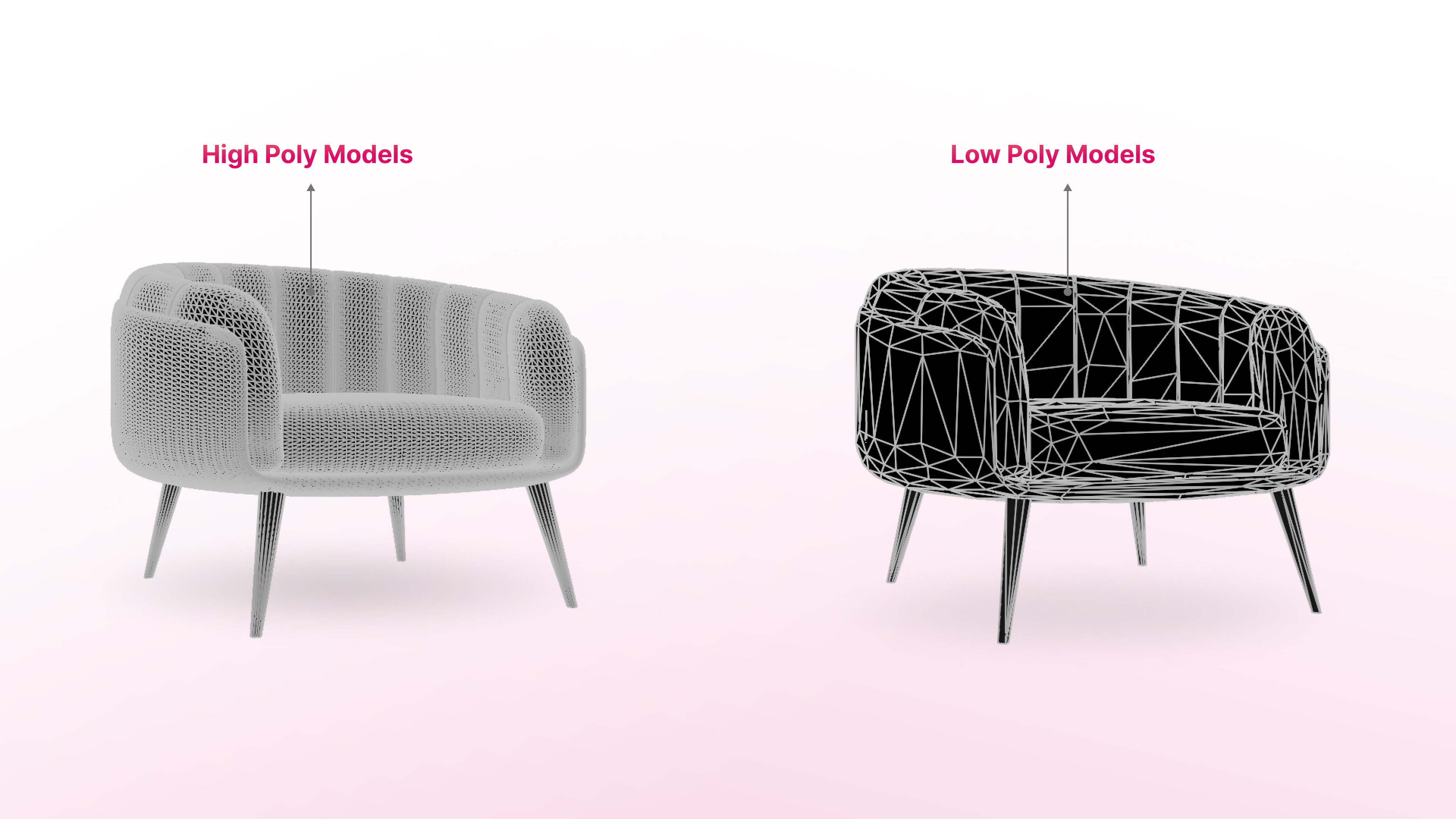
In the realm of 3D design, particularly within augmented reality (AR) applications, the terms "high poly" and "low poly" are frequently encountered. These terms refer to the polygon count within a 3D model, significantly influencing its appearance, performance, and suitability for various applications. This article delves into the distinctions between high poly and low poly models, their respective applications, and their relevance in AR.
What are 3D models?
A 3D model is a digital representation of an object, constructed using a mesh of polygons geometric shapes like triangles or quadrilaterals. These polygons form the surface of the model, defining its shape and detail. The number of polygons, or "polygon count," determines the model's complexity and visual fidelity.
Understanding polygon count
- High Poly Models: These models comprise a large number of polygons, resulting in intricate detail and smooth surfaces. High poly models are ideal for scenarios where visual fidelity is paramount, such as in films or architectural visualizations. However, they require substantial computational resources, leading to increased rendering times and larger file sizes.
- Low Poly Models: In contrast, low poly models utilize fewer polygons, leading to simpler, more angular appearances. They are favored in applications like video games and AR/VR experiences, where real-time rendering and performance efficiency are crucial. While they may lack the detailed realism of high poly models, techniques like normal mapping can enhance their visual appeal without significantly increasing polygon count.
Applications and use cases
- High Poly Models: Predominantly used in industries requiring high visual fidelity, such as film, animation, and product design. They are suitable for static high-resolution renders, close-up views, and scenarios where detail is critical.
- Low Poly Models: Essential in performance-critical applications like video games, mobile applications, and AR/VR experiences. Their reduced complexity ensures faster rendering and smoother performance, making them ideal for interactive environments.
Importance in augmented reality
In AR applications, balancing visual quality with performance is crucial. High poly models can strain device resources, leading to lag or reduced responsiveness. Conversely, low poly models, optimized for performance, ensure smoother user experiences. Employing techniques like normal mapping allows developers to simulate detailed textures on low poly models, achieving a balance between aesthetics and functionality
Choosing between high poly and low poly models
Deciding whether to use high poly or low poly models depends on several factors, each tied to the project’s goals, target audience, and technical requirements. This section explores the key considerations to help you make an informed choice.
Project Requirements
Your project’s end goal should be the primary determinant. Ask yourself:
- What is the intended use of the model? High poly models are ideal for static visuals like promotional renders, films or architectural designs where detail and photorealism matter. On the other hand, low poly models are better for interactive applications such as games, AR/VR experiences, or mobile apps that demand real-time rendering.
- How important is visual detail? If your project involves close-up views or intricate textures, high poly models will deliver the necessary depth. Conversely, for distant or generalized visuals, low poly models suffice and save resources.
Target Platform and Device Limitations
Consider the devices and platforms where your 3D models will be displayed:
- High-End Devices: Devices with powerful GPUs can handle high poly models without significant performance issues. For instance, gaming consoles or high-performance desktops are suitable for high poly environments.
- Resource-Constrained Devices: Smartphones, AR/VR headsets, and tablets often have limited processing power. For these, low poly models ensure smoother interactions and faster load times, improving user experience.
Performance vs. Aesthetic Balance
Striking the right balance between visual quality and performance is crucial. While high poly models provide exceptional realism, they can slow down applications due to longer rendering times and increased file sizes. This is especially problematic for:
- Real-Time Applications: Games and AR/VR experiences rely on low latency to maintain user immersion. Low poly models excel here as they reduce computational strain.
- Large-Scale Projects: Projects with multiple assets—like open-world games or AR retail catalogs—benefit from low poly models, as they ensure a cohesive and efficient system.
Development Time and Costs
High poly models typically take more time to create due to their complexity and the detailing involved. They may also require more experienced modelers and expensive rendering tools. Conversely, low poly models are quicker and cheaper to produce, making them suitable for:
- Tight Budgets: Indie game developers or startups often prioritize cost-effective solutions like low poly assets.
- Rapid Iteration Cycles: Projects with frequent updates or short deadlines benefit from the agility of low poly workflows.
Optimizing Models for Use Cases
If your project needs aspects of both high poly and low poly models, hybrid approaches can provide solutions:
- Normal Mapping: Apply texture maps to low poly models to simulate high-detail surfaces without increasing polygon count.
- LOD (Level of Detail): Use high poly models for close-ups and low poly models for distant objects in the same application, ensuring optimal performance.
Scalability for Future Use
Think about how your 3D models might be repurposed:
- Future-Proofing Assets: High poly models can be simplified into low poly versions later, but the reverse isn’t as straightforward.
- Cross-Platform Adaptation: Models designed for low poly use can be easily scaled for platforms like AR apps, but adapting high poly models to mobile can require significant rework.
User Experience Considerations
End-user experience should always be a priority:
- Smooth Interactivity: For games or AR applications, low poly models ensure lag-free interaction.
- Visual Immersion: For detailed storytelling or cinematic experiences, high poly models elevate user engagement.
By evaluating these factors, you can determine whether high poly or low poly models align better with your project’s goals and constraints. Understanding your audience’s expectations and the technological environment ensures a choice that delivers both performance and aesthetics.
Best Practices for 3D Modelers
Efficient Modeling Techniques: Focus on creating models that meet the project's visual requirements without unnecessary complexity. Utilize optimization techniques to reduce polygon count while maintaining visual appeal.
Balancing Detail and Performance: Employ methods like normal mapping and texture baking to add detail to low poly models, ensuring they appear detailed without the performance drawbacks of high poly models.
Future Trends in 3D Modeling
Advancements in technology are continually influencing 3D modeling practices. The increasing power of hardware allows for more complex models in real-time applications. Additionally, evolving software tools are making it easier to create optimized models that balance detail and performance, catering to the growing demand for immersive experiences in AR and VR.
Conclusion
Understanding the distinctions between high poly and low poly models is essential for 3D designers, especially in the context of augmented reality. By carefully considering project requirements, hardware limitations, and desired outcomes, designers can choose the appropriate modeling approach to create engaging and efficient 3D experiences.