Configuration
Configure Capture IQ with HTML attributes on <glamar-captureiq> and optional JSON in the config attribute (or the config property). You can also set top-level options in that JSON next to nested sections.
Create your api-key in the PixelBin console—see Getting Started.
GlamAR SDK: Capture IQ vs legacy capture
When you embed GlamAR SDK (Try-on, Skin Analysis, SkinGPT), the SDK can run either the Capture IQ guided camera (<glamar-captureiq>) or the legacy in-SDK capture flow (live camera, distance/alignment panels, image preview, and flow-specific APIs). Routing is controlled in sdkConfig.customCode, not on the Capture IQ element alone.
Where to configure (customCode.captureIQ)
| Flow | Configure in | Path |
|---|---|---|
| Skin Analysis | App config (per Skin Analysis app) | appConfig.ui_config.customCode.captureIQ |
| SkinGPT | App config (same Skin Analysis app) | appConfig.ui_config.customCode.captureIQ |
| Nail color (VTO) | SDK configuration (org-level AR Try-on) | sdkConfig.customCode.captureIQ |
| Eye PD (glasses VTO) | SDK configuration | sdkConfig.customCode.captureIQ |
| Eyewear recommendation (after quiz) | SDK configuration | sdkConfig.customCode.captureIQ |
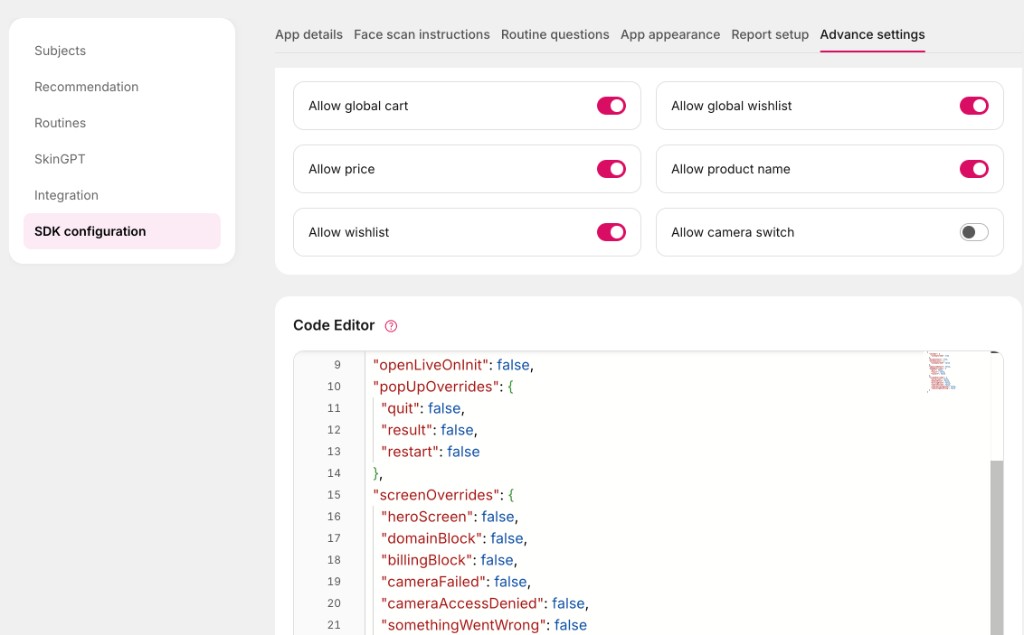
- App config: edit in the GlamAR console under your Skin Analysis app → SDK Configuration → Advance settings → Code Editor, or via the Create App API
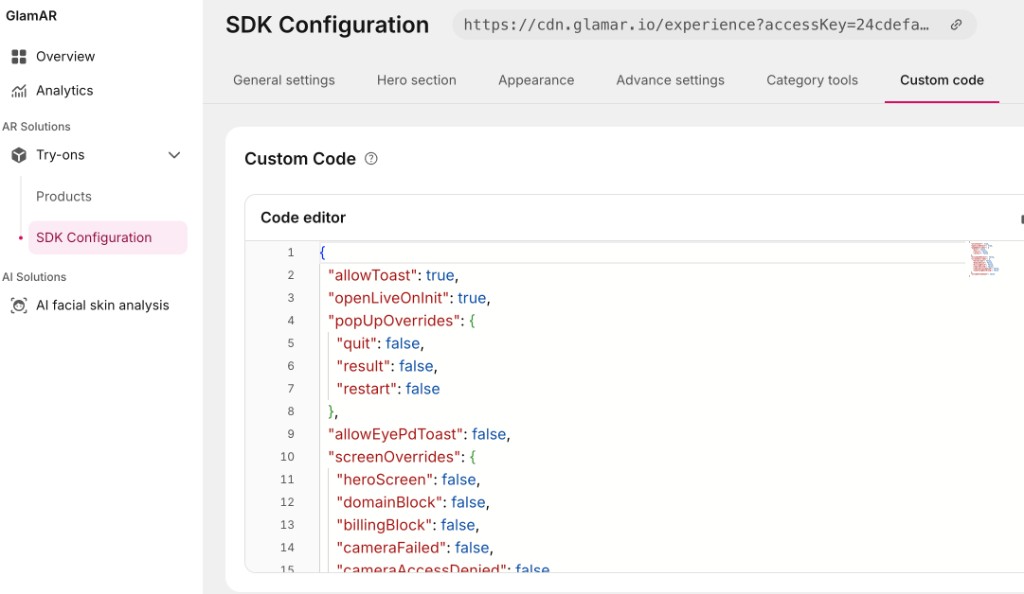
appConfig.ui_config.customCode. Publish the app for changes to apply to live embeds. - SDK configuration: edit under GlamAR → Try-ons → SDK Configuration → Custom code (org-level settings stored with SDK settings). See AR Try-on SDK Configuration and Managing Skin Analysis apps for the respective consoles.
SDK configuration (Virtual Try-on)
Use this console for nail color, Eye PD, and eyewear recommendation (sdkConfig.customCode)
App configuration (Skin Analysis / SkinGPT)
Use this console for Skin Analysis and SkinGPT (appConfig.ui_config.customCode). Open your app’s SDK configuration → Advance settings → Code Editor and add captureIQ under customCode.
customCode.captureIQ schema (SDK routing)
Use this object to turn Capture IQ on per flow. It does not replace the JSON on <glamar-captureiq config="…"> (quality, camera, ui.showFps, etc.)—that remains for tuning the widget when the SDK hosts it.
{
  "captureIQ": {
    "enabled": true,
    "retakeRedirect": "home",
    "routes": {
      "skinAnalysis": true,
      "skinGpt": true,
      "eyePd": true,
      "nailColor": true,
      "eyewearRecommendation": true
    }
  }
}
| Field | Type | Description |
|---|---|---|
enabled | boolean | Master switch. If false, all flows use legacy capture regardless of routes. |
retakeRedirect | "home" | "camera" | After review retake in Capture IQ: "home" destroys the web component and returns to the SDK route root; "camera" stays in Capture IQ and restarts the camera. Falls back to legacy customCode.retakeRedirect if omitted. |
routes | object | Per-flow flags (see table below). |
routes key | GlamAR flow | Legacy capture when false or Capture IQ off |
|---|---|---|
skinAnalysis | Face scan / analysis start | Live camera, lighting and distance UI, legacy snapshot pipeline |
skinGpt | SkinGPT image capture | Same style of legacy live + preview flow |
eyePd | Eye PD on glasses try-on | Legacy face-camera and Eye PD screens |
nailColor | Nail polish VTO | Hand tracking, alignment UI, image viewer → nail segmentation API |
eyewearRecommendation | Post–quiz capture for eyewear recommendation | Legacy live camera after quiz |
Capture IQ runs only when captureIQ.enabled is true and the route flag for that flow is true.
useCaptureIQ flagsIf captureIQ is missing, the SDK may still honor older per-flow flags such as customCode.skinAnalysis.useCaptureIQ or customCode.nailColor.useCaptureIQ. Prefer the unified captureIQ object for new integrations.
Example: Skin Analysis app (app config)
In the app’s SDK configuration → Advance settings → Code Editor (see screenshot above):
{
  "customCode": {
    "captureIQ": {
      "enabled": true,
      "retakeRedirect": "home",
      "routes": {
        "skinAnalysis": true,
        "skinGpt": true
      }
    }
  }
}
Set skinAnalysis / skinGpt to false to keep legacy capture for that flow only.
Example: Virtual Try-on (SDK configuration)
In Try-ons → SDK Configuration → Custom code (see screenshot above). Org-level settings for nail, Eye PD, and eyewear recommendation (Skin Analysis routes are usually configured on the app, not here):
{
  "customCode": {
    "captureIQ": {
      "enabled": true,
      "retakeRedirect": "home",
      "routes": {
        "eyePd": true,
        "nailColor": true,
        "eyewearRecommendation": true
      }
    }
  }
}
How values are merged
Effective settings are built in layers:
runtime defaults → built-in preset (`face` or `hand`) → your `config` JSON / attributes
Nested objects (quality, camera, capture, output, etc.) are deep-merged: you only override the keys you need.
See Presets for what each preset supplies by default.
HTML attributes
| Attribute | Required | Description |
|---|---|---|
api-key | Yes | Capture IQ api-key (test_… or live_…). |
preset | No | Documented values: face (default) or hand. |
config | No | JSON string merged into the preset (see sections below). |
locale | No | Locale (e.g. en, en-US). Defaults from the browser. |
theme | No | Theme name or JSON for Shadow DOM styling. |
debug | No | true / false or presence—extra logging and diagnostics. |
shadow | No | Reserved for future Shadow DOM switches. |
JavaScript properties
Kebab-case attributes map to camelCase properties on the element: api-key → apiKey, preset → preset, config → config, etc.
Example
<glamar-captureiq
  api-key="YOUR_KEY"
  preset="face"
  config='{"capture":{"autoCapture":true,"maxAttempts":4},"output":{"maxWidth":1280,"maxHeight":720,"quality":0.9}}'
  locale="en-US"
></glamar-captureiq>
JSON structure (reference)
Only include objects and keys you need.
{
  "preset": "face" | "hand",
  "sources": string[],
  "allowRetake": boolean,
  "enableTutorial": boolean,
  "quality": { /* see Quality */ },
  "camera": { /* see Camera */ },
  "capture": { /* see Capture behavior */ },
  "output": { /* see Output */ },
  "license": { "validateUrl": string | null },
  "ui": { /* see UI and flow */ },
  "flow": { "steps": string[] },
  "extra": Record<string, unknown>
}
Quality (config.quality)
Used by the live quality loop (lighting, face or hand framing, alignment). Numeric thresholds are 0–1 unless noted otherwise.
Face-oriented fields
These apply when you use the face preset (or override quality while using face-like guidance):
| Field | Typical role |
|---|---|
brightnessMin | Minimum acceptable luma (lighting). |
blurMin | Sharpness-related floor (reserved / lightly used in some builds). |
contrastMin | Contrast floor (reserved / lightly used in some builds). |
facePresenceMin | Combined face presence requirement. |
faceSizeMin | Minimum face height / frame height ratio (too far if below). |
faceSizeMax | Maximum same ratio (too close if above). |
alignmentScoreMin | Minimum center alignment score (0–1). |
yawMin | Minimum head yaw score when that signal is available (0–1). |
pitchMin | Minimum pitch score when available (0–1). |
lightDetectorType | "old" or "new" — which lighting classifier path to use. |
lightDetectorModelBaseUrl | Optional base URL or .json URL for the new detector model when self-hosting. |
Built-in face preset (before your overrides) uses values such as: brightnessMin 0.35, facePresenceMin 0.3, faceSizeMin 0.16, faceSizeMax 0.3—see Presets for the full idea; tune in JSON for harder or easier passes.
Example stricter lighting and framing:
{
  "quality": {
    "brightnessMin": 0.45,
    "facePresenceMin": 0.45,
    "faceSizeMin": 0.2,
    "faceSizeMax": 0.28
  }
}
Hand preset (quality.hand)
When preset is hand, framing uses quality.hand thresholds (distance scores and normalized palm position). Defaults are tuned for desktop vs mobile; override only if you understand the scoring (see GlamAR support or advanced SDK notes).
Camera (config.camera)
Passed to the browser as ideal getUserMedia constraints. The device may pick a lower resolution or frame rate if it cannot satisfy the request.
| Field | Description |
|---|---|
width | Preferred stream width (pixels). |
height | Preferred stream height (pixels). |
frameRate | Preferred FPS. |
facingMode | "user" (front) or "environment" (back). |
If you omit camera, the runtime still requests a strong default (typically 1920×1080 at 30 fps with user facing mode). Override if you need lighter streams on low-end devices.
{
  "camera": {
    "width": 1280,
    "height": 720,
    "frameRate": 30,
    "facingMode": "user"
  }
}
Capture behavior (config.capture)
| Field | Description |
|---|---|
autoCapture | If true, the flow can trigger capture when quality has been stable long enough (holdSteadyMs). If false, the user relies on explicit actions / your calls to capture(). |
holdSteadyMs | How long quality must stay in the “pass” band before an auto capture is considered (milliseconds). |
cooldownMs | Minimum time between auto capture attempts (milliseconds). |
maxAttempts | Maximum number of auto capture attempts in a session before the flow stops with error code auto-capture-max-attempts. |
face preset defaults (indicative): autoCapture true, holdSteadyMs 800, cooldownMs 1200, maxAttempts 3. hand uses the same style of defaults for these fields.
{
  "capture": {
    "autoCapture": true,
    "holdSteadyMs": 900,
    "cooldownMs": 1500,
    "maxAttempts": 4
  }
}
See Events for captureAttempt (reason: cooldown, maxAttempts, etc.).
Output (config.output)
Controls still-image encoding after capture.
| Field | Description |
|---|---|
format | blob (default), dataUrl, or both. |
mimeType | e.g. image/jpeg, image/webp — must be encodable in the browser. |
maxWidth / maxHeight | Optional caps; image is downscaled to fit, aspect ratio kept, never upscaled. Omit or set null for no cap. |
quality | Encoder quality 0–1 (e.g. JPEG). |
face and hand presets default to format: "blob", mimeType: "image/jpeg", quality: 0.92**, with maxWidth / **maxHeight** unset (output size follows the captured frame until you cap it).
{
  "output": {
    "format": "both",
    "mimeType": "image/jpeg",
    "maxWidth": 1280,
    "maxHeight": 720,
    "quality": 0.9
  }
}
Capture result shape
On success paths you receive an object like:
{
  artifact: {
    blob: Blob;
    dataUrl?: string;
    width: number;
    height: number;
    mimeType: string;
  };
  metadata: {
    captureId: string;
    sessionId: string;
    preset: string;
    deviceInfo: { deviceId?: string | null; label?: string | null };
    qualitySnapshot: object | null;
    timestamps: { startedAt: number; completedAt: number };
  };
}
The DOM captureSuccess event carries this under event.detail.result after the user confirms a passing capture—see Events.
License (config.license)
For production, you can validate keys on your backend:
{
  "license": {
    "validateUrl": "https://your-backend.example.com/captureiq/license/validate"
  }
}
Your endpoint should return JSON such as { "valid": true } or { "valid": false, "code": "...", "message": "..." }. Listen for licenseError on the element.
UI and flow (config.ui, config.flow)
ui.instructions,ui.errors,ui.buttons— override preset copy (keys depend on the UI; start from defaults and change text only).ui.showFps— settrueto show a small FPS / throughput overlay during preview (useful for performance tuning). Default in the Capture IQ package may be on; setfalsefor production GlamAR SDK embeds (see GlamAR SDK).flow.steps— optional ordered list of step ids. If you set it, it must include:permission,guidance,capture,confirm.
{
  "ui": {
    "showFps": false,
    "instructions": {
      "intro": "Align your face with the frame",
      "lighting": "Make sure your face is clearly visible",
      "alignment": "Keep your head centered"
    },
    "buttons": {
      "start": "Begin",
      "retry": "Try again",
      "confirm": "Use photo",
      "cancel": "Cancel"
    }
  },
  "flow": {
    "steps": ["permission", "guidance", "capture", "confirm"]
  }
}
Sources (config.sources)
Optional list of allowed capture sources (e.g. front vs back camera). The default is effectively front camera unless you change it. Exact allowed strings follow the SDK; ask GlamAR if you need back or upload flows.
Validation and errors
Before merge, the widget validates the shape of your JSON where applicable:
quality: listed 0–1 thresholds must be numbers in [0, 1];faceSizeMinmust be ≤faceSizeMaxwhen both are set.camera:width,height,frameRatemust be positive numbers if set;facingModemust beuserorenvironment.flow.steps: if present, must be an array containingpermission,guidance,capture,confirm.preset: must be a supported id (faceorhandfor these docs).
Invalid JSON string on the attribute → error with code config-parse-error.
Semantic problems → configError with { errors: string[], config, sdkVersion }.
See Events and Troubleshooting.