


Virtual Try-On for Shopify: A Practical Guide


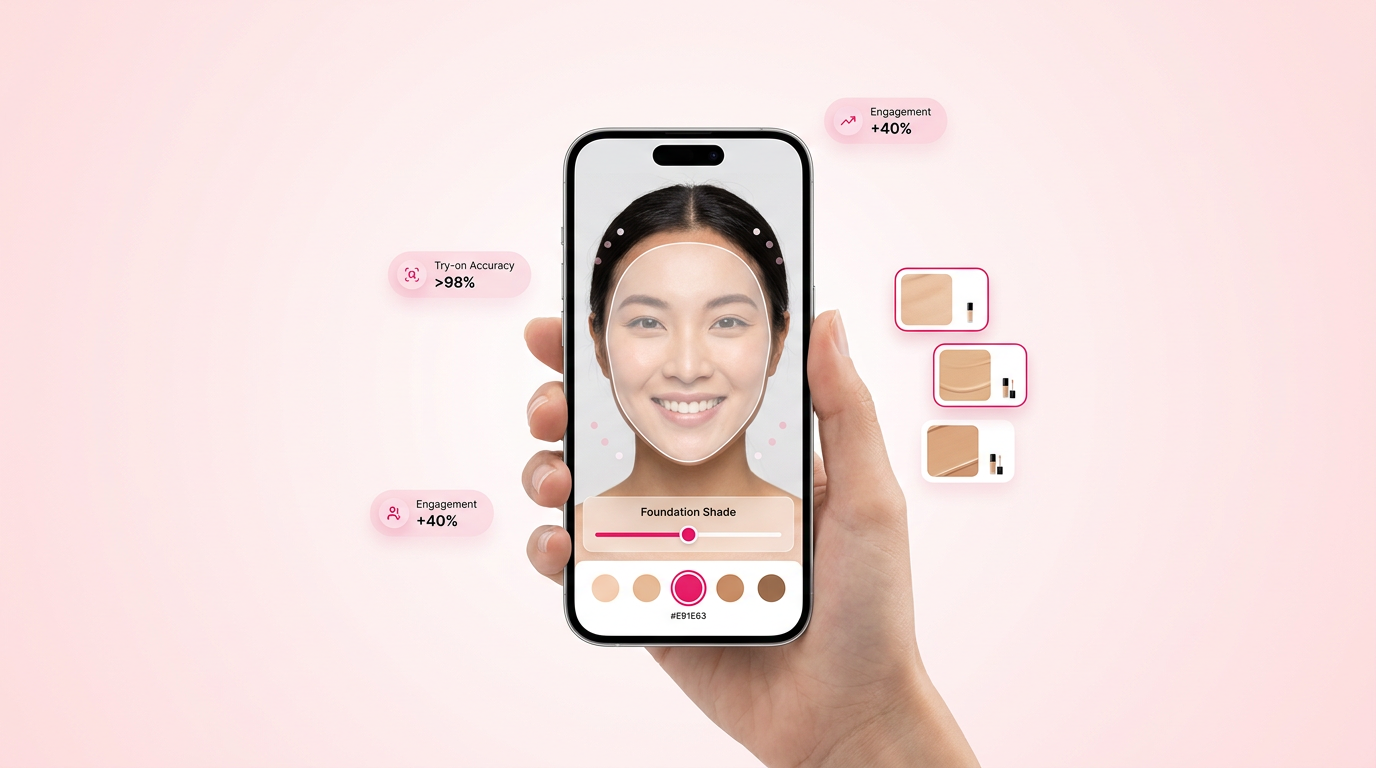
Imagine a world where your customers can try before they buy, right from their living room. That's the innovation of virtual try-on for Shopify. This technology allows online shoppers to visualize products like clothes, makeup, or accessories on themselves virtually. For retailers, it’s a significant advantage, reducing return rates and noticeably boosting conversion rates.
Virtual try-on technology is changing how e-commerce brands connect with their customers. With Shopify, one of the leading e-commerce platforms, brands can now include this feature to boost shopping experiences. As more shoppers seek interactive and personalized shopping experiences, integrating virtual try-on solutions has become a strategic move for forward-thinking brands.
Glance at the top virtual try-on solutions
There's many virtual try-on solutions fitted to specific industry needs and customer preferences. Here are some of the top solutions available:
- GlamAR
- Best for: Thorough AR solutions
- Standout features: 3D product viewer, AR ads, easy Shopify integration
- Camweara
- Best for: Jewelry and eyewear
- Standout features: Real-time AR, lightweight interface
- Antla
- Best for: Fashion and apparel
- Standout features: AI-driven fitting, size chart integration
Each of these solutions caters to different industries and requirements, allowing brands to choose based on their specific needs. For example, fashion brands may prefer Antla's AI-driven fitting, which offers a more personalized customer experience. By analyzing customer preferences and previous purchases, Antla can provide recommendations that improve the shopping experience.
What is a virtual try on, and what are its key features?
Understanding Virtual Try-On
Virtual try-on is an augmented reality (AR) technology that allows users to see how products look on them using digital simulations. This technology bridges the gap between physical and online shopping by providing a realistic view of how a product would appear in real life. It uses advanced algorithms to map products onto the user's body, ensuring that the virtual representation is as accurate as possible.
Key Features of Virtual Try-On
- Real-time visualization: Users can see products on their bodies instantly, making it easier to visualize purchases.
- Device compatibility: Works smoothly on smartphones and web browsers, ensuring accessibility for all users.
- Customization: Tailor experiences with different styles and colors, offering personalized shopping.
- Easy integration: Compatible with platforms like Shopify, allowing for straightforward setup and usage.
- Interactive user interface: A user-friendly interface that allows customers to work through and interact with products easily.
Benefits of implementing virtual try-on on Shopify
Enhancing Customer Experience
Integrating virtual try-on technology on Shopify offers numerous advantages: it creates a more engaging and personalized shopping experience, which is more likely to convert curious browsers into loyal customers. Shopify makeup conversion can significantly enhance the customer journey.
- Reduced returns: Customers make more informed purchases, cutting return rates by up to 30% (Shopify 2025).
- Increased conversion rates: Engaging experiences lead to higher cart completion.
- Enhanced customer experience: Personalized shopping builds brand loyalty.
- Competitive edge: Stand out in a crowded market with new technology.
- Increased trust: By enabling customers to see and test products virtually, brands can build trust and credibility.
Financial Impact on Retailers
For retailers, using virtual try-on technology not only boosts sales but also reduces the operational costs associated with handling returns. This can a lot improve the bottom line and resource allocation within a business. Retailers can use the data collected from virtual try-ons to better predict trends and consumer preferences, enhancing their marketing strategies.
Plus, by reducing the rate of returns, retailers can lower the associated costs of restocking and reselling returned products, thus optimizing their inventory management processes. This also means less waste and a more sustainable model by minimizing the carbon footprint associated with shipping and packaging (Statista 2025).
Implementation Steps for Virtual Try-On
Preparing Your Store
The first step in implementing virtual try-on technology is to ensure that your Shopify store is ready for integration. This involves:
- Updating product imagery: High-quality images and 3D models of your products will improve the virtual try-on experience. Consider employing professional photographers and 3D artists to refine your images.
- Verifying technical compatibility: Ensure your store's technical infrastructure can support the additional data and processes. It's essential to consult with your IT team or a technical expert to assess this readiness.
- Training staff: Ensure your team understands how to use and support this new technology. Regular training sessions and workshops can help your team stay updated with the latest features and troubleshooting tactics.
Executing Integration
Once your store is prepared, the next step is the actual integration:
- Select a solution: Choose the virtual try-on provider that best suits your brand's needs. Shopify 3D viewer AR try-on engagement can be a valuable resource.
- Integrate with Shopify: Add the provider's plugin or application to your Shopify store. This might require some coding knowledge, so having a developer can ease the integration process.
- Customize settings: Adjust the settings to align with your brand's aesthetics and customer preferences. Consider color schemes, fonts, and user interface layouts that match your brand identity.
- Test extensively: Conduct thorough testing to ensure the functionality works as expected across different devices and browsers. Engage beta testers or a focus group to gather constructive feedback before the full launch.
Industry Examples of Virtual Try-On Success
Beauty Industry
In the beauty industry, brands like Sephora have used virtual try-on technology to allow customers to test makeup products from the comfort of their homes. This has not only improved customer satisfaction but also noticeably boosted their online sales. For instance, Sephora's "Virtual Artist" app lets users try different shades of lipstick and eye shadows in real-time, leading to increased interaction and sales.
Fashion Industry
Fashion giants such as ASOS and Zara have implemented virtual try-ons to allow customers to visualize how clothes fit their body types. This has led to an increase in conversion rates and a decrease in the number of returns, as customers feel more confident in their purchasing decisions. ASOS's AR tool allows customers to see how different sizes and styles look on models that closely match their body type, thus providing a more fitted shopping experience.
Common Mistakes to Avoid
Overlooking Compatibility
One of the most common mistakes when implementing virtual try-on solutions is not ensuring compatibility with existing systems. This can lead to technical difficulties and a poor user experience. It is important to consult with IT professionals to ensure that the new system integrates smoothly with existing software and hardware solutions.
Ignoring Customer Feedback
Another critical error is neglecting to listen to customer feedback post-implementation. Continuous improvement based on user experience is essential to maximizing the benefits of virtual try-ons. Implement feedback loops through surveys or direct communication channels to understand user expectations and pain points.
Best Practices for Virtual Try-On Integration
Focusing on User Experience
A smooth user experience is important for the success of virtual try-on technology. Ensure that the interface is intuitive and the process of trying on products virtually is as smooth as possible. Intuitive navigation, minimal loading times, and easy access to help resources are essential components.
- Responsive design: Ensure the virtual try-on feature is mobile-friendly. With growing mobile usage, ensuring compatibility across devices is critical.
- Quick load times: Improve the application to reduce loading times. Use efficient coding practices and compress images where possible.
- Clear instructions: Provide users with clear instructions on how to use the feature effectively. Interactive guides or tooltips can improve user understanding and satisfaction.
Regular Updates and Improvements
Technology is constantly evolving, and so should your virtual try-on solution. Regular updates will help you stay competitive and offer the best possible experience to your customers. Staying up to date with the latest technological advancements ensures that your system remains efficient and user-friendly.
How does GlamAR's solution help with virtual try-on?
3D Product Visualization
GlamAR offers modern virtual try-on solutions that integrate effortlessly with Shopify, enhancing customer interaction and reducing return rates. Features include: 3D product visualization, which offers an engaging shopping experience, allowing customers to interact with products more dynamically.
AI-Driven Insights
AI-driven insights provide data for targeted marketing. These insights help in creating personalized marketing campaigns that connect with specific customer segments. Explore GlamAR's virtual try-on for eyewear to see how it can transform your brand’s customer experience. With sophisticated algorithms, GlamAR ensures that products align accurately with real-world conditions.
How to integrate virtual try-on with Shopify
Choosing a Provider
Integrating virtual try-on with Shopify involves several steps, starting with selecting a platform that fits your needs. Look for providers who offer full support and customization options. Assess provider portfolios and customer testimonials to gauge effectiveness and reliability. See our complete guide on virtual jewelry try-on for a deeper dive.
- Choose a provider: Select a platform that fits your needs. Consider providers like GlamAR for their solid feature set and ease of integration.
- Install the plugin: Add the virtual try-on feature through your Shopify dashboard. This usually involves simple steps but may require technical support.
- Customize your options: Tailor the experience to match your brand’s identity. Customization options might include branding colors, font styles, and layout adjustments.
- Test the setup: Ensure functionality before launching to customers. Testing should cover different user scenarios to cover a broad spectrum of potential interactions.
Customization and Testing
Customizing the virtual try-on settings to align with your brand’s aesthetic and thorough testing before going live ensures a smooth user experience, key for customer satisfaction and long-term success. Use user feedback to refine features and address any usability issues identified during testing.
For more insights, explore GlamAR's virtual try-on solutions to see how they can benefit your brand.
Launch and Monitoring
After thorough testing, launch the virtual try-on feature and continuously monitor its performance. Gathering data on customer interactions can provide insights for further optimizations and enhancements. Use analytics tools to track interaction rates and identify opportunities for feature improvements (McKinsey 2024).
Conclusion
Virtual try-on technology for Shopify is an investment in your brand’s future, offering significant returns in terms of customer satisfaction and conversion rates. By choosing the right provider, like GlamAR, you ensure your brand remains competitive in a rapidly evolving digital field. Ready to transform your e-commerce strategy? Explore GlamAR's solutions today.
For more on how virtual try-ons can enhance your Shopify store, visit Shopify's guide on AR try-on clothes.
Using virtual try-on involves selecting a product and enabling the AR feature on your device. This allows you to visualize how the product looks on you in real time. GlamAR's solutions offer seamless integration with Shopify, enhancing customer experience.
Virtual try-on is a technology that uses augmented reality to let users see how products look on them digitally. It enhances online shopping by providing a realistic preview of items like clothing or accessories. This technology provides users with a more interactive and engaging shopping experience, allowing them to make more informed purchase decisions, thereby reducing.
Building a virtual try-on system requires choosing a provider, installing a Shopify plugin, and customizing features to match your brand. Providers like GlamAR offer comprehensive solutions for easy integration. Additionally, ensure that your technical infrastructure supports the data and processes involved, and conduct thorough testing to ensure functionality across devices.
To use Shopify's free trial, sign up on their website, choose a plan, and build your store. This trial lets you test features like virtual try-on before committing. GlamAR can integrate within this platform for enhanced features.
Industries like beauty, fashion, eyewear, and jewelry benefit most from virtual try-on by allowing customers to visualize products and make informed decisions, reducing returns. For example, in the fashion industry, virtual try-on can help customers see how clothes fit their body type, leading to increased confidence in purchasing decisions and fewer returns.
Virtual try-on increases sales by enhancing customer engagement and confidence in product selection, which results in higher conversion rates. GlamAR’s solutions offer data-driven insights to improve marketing strategies.
Discover how AR, VR and 3D can drive revenue growth in 2026
Schedule a call with our team

.avif)